Kubecost on EKS: From Cost Visibility to Actual Savings
Quick summary: Production guide for Kubecost on AWS EKS: cost allocation setup, plus the architecture changes that reduce spend instead of just attributing it.
Key Takeaways
- Production guide for Kubecost on AWS EKS: cost allocation setup, plus the architecture changes that reduce spend instead of just attributing it
- Kubecost gives EKS teams namespace-, pod-, and label-level cost allocation
- As of June 2026, AWS split cost allocation for EKS in CUR 2.0 helps attribute shared cluster infrastructure costs
- Accurate allocation, flat total cost: teams know who spent, but nobody reduces cluster size 2
- Missing AWS-level costs: NAT, cross-AZ, EBS, and load balancers are absent from the K8s-only view 3
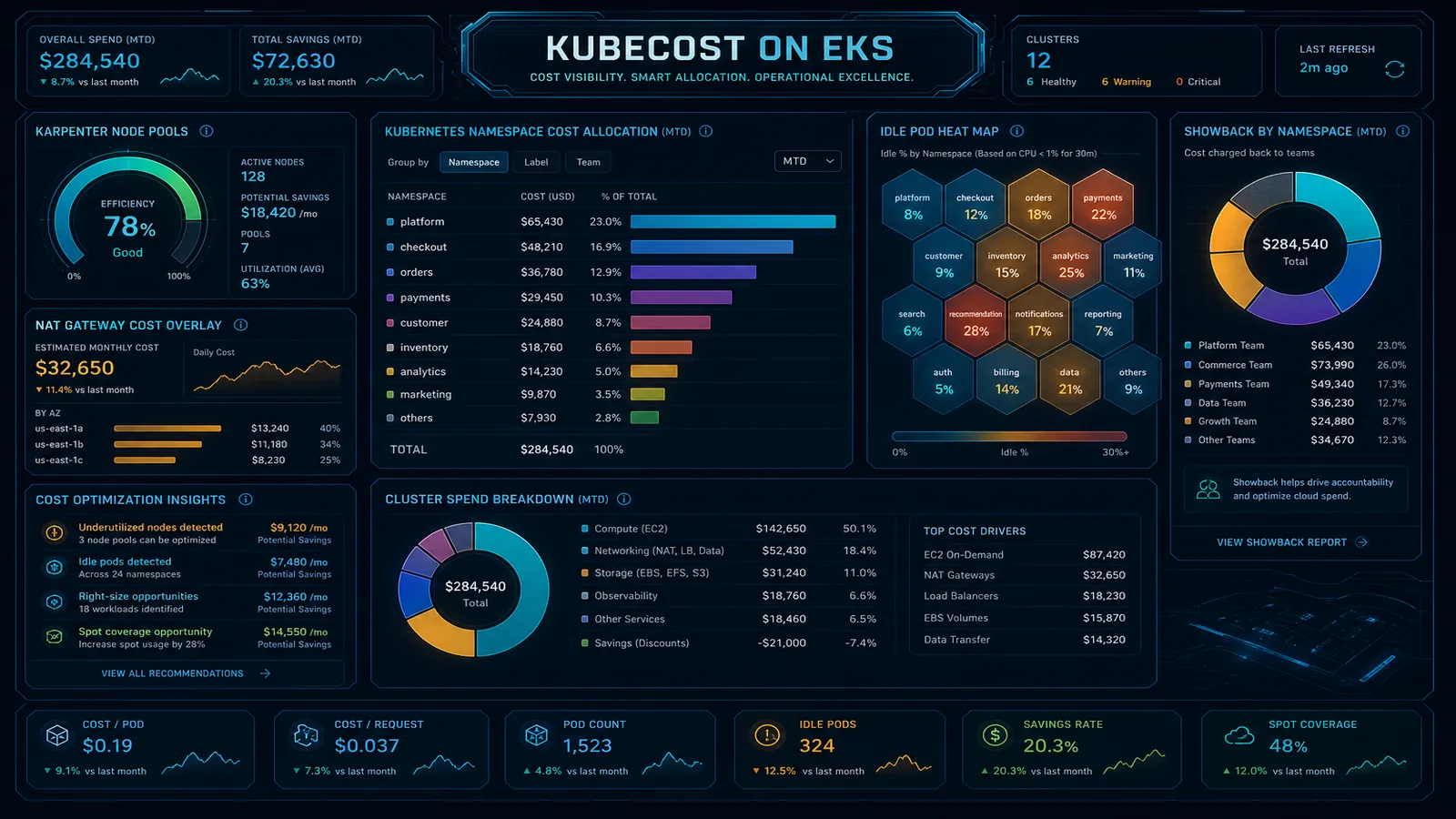
Table of Contents
Kubecost gives EKS teams namespace-, pod-, and label-level cost allocation. As of June 2026, AWS split cost allocation for EKS in CUR 2.0 helps attribute shared cluster infrastructure costs. Enable it before trusting Kubecost showback numbers for chargeback.
Engagement shape we see often: an EKS-heavy SaaS, 3 to 6 clusters, Kubecost deployed with accurate namespace allocation, total AWS bill still climbing because NAT processing, cross-AZ transfer, and over-provisioned m5 node groups sit outside the Kubernetes view.
Visibility is necessary but not sufficient. Most clusters need architecture changes (rightsizing, Karpenter, topology-aware routing, observability cost control) to move the total bill.
What Kubecost does well
- Real-time Kubernetes cost allocation
- Showback/chargeback by team, namespace, label
- Integration with AWS billing via CUR or cost model
- Recommendations for idle workloads and efficiency
- Open-core model with enterprise features for multi-cluster
Where teams stall
- Accurate allocation, flat total cost: teams know who spent, but nobody reduces cluster size
- Missing AWS-level costs: NAT, cross-AZ, EBS, and load balancers are absent from the K8s-only view
- Over-provisioned node groups: m5.2xlarge defaults “for headroom”
- Observability tax: metrics and logs costs exceed workload costs
- No link to commitment strategy: EKS compute is not in the SP baseline
Reference architecture
┌─────────────┐     ┌──────────────┐     ┌─────────────────┐
│  EKS cluster│────▶│   Kubecost   │────▶│  Team dashboards│
│  + labels   │     │  (in-cluster)│     │  + chargeback   │
└──────┬──────┘     └──────────────┘     └─────────────────┘
       │
       ▼
┌──────────────────────────────────────────────────────────┐
│ AWS bill: EC2 (nodes), EBS, ELB, NAT, cross-AZ, CUR      │
└──────────────────────────────────────────────────────────┘
Include AWS split cost allocation for shared cluster costs in CUR 2.0.
Implementation steps
1. Deploy Kubecost
- Helm install in
kubecostnamespace - Connect to AWS via IAM role (CUR S3 bucket or cost API)
- Standardize labels:
team,env,cost-centeron namespaces
2. Baseline allocation accuracy
- Target 85%+ allocatable pod cost tagged
- Document untagged workloads; enforce admission policy (OPA/Kyverno)
3. Architecture savings (where the bill actually drops)
| Lever | Typical impact |
|---|---|
| Karpenter vs fixed node groups | 30–50% node cost on variable workloads |
| Graviton node families | 20–40% vs x86 |
| Topology-aware routing | Reduce cross-AZ data transfer |
| Right-size requests/limits | Fewer nodes required |
| VPC endpoints for ECR/S3/API | Cut NAT processing fees |
| Log/metrics sampling | Cut observability line item |
See EKS cost optimization in AWS Open Guide.
4. Operational cadence
- Weekly: Kubecost idle workload report → ticket or scale-down
- Monthly: node family review vs Compute Optimizer
- Quarterly: full cluster efficiency review with cost pitfalls
What to do this week
- Kubecost deployed; CUR or cost API connected
- Namespace labels enforced for all tenant workloads
- AWS split cost allocation enabled for EKS
- Karpenter or Cluster Autoscaler with appropriate node pools
- NAT/endpoints audited for cluster egress patterns
- Showback shared with engineering leads monthly
- SP/RI baseline includes stable EKS compute
FactualMinds EKS Cost Optimization (4 weeks)
Fixed scope:
- Kubecost deployment + allocation model
- Karpenter/rightsizing implementation
- NAT/VPC endpoint architecture review
- Measured savings report + handoff
This pairs with Kubecost: we implement what allocation surfaces.
What this post doesn’t cover
Multi-cluster Kubecost federation, OpenCost migration paths, and Fargate-only EKS cost models. Those workloads need separate allocation patterns.
Related Reading
- FinOps platform hub: Kubecost
- Deploy EKS with Karpenter
- Karpenter vs Cluster Autoscaler
- nOps vs AWS native FinOps
- AWS Cost Optimization services
Frequently asked questions
Does Kubecost reduce EKS costs automatically?
How do I connect Kubecost to AWS billing?
When should I add implementation help after deploying Kubecost?

Ecommerce Growth & Retail Marketplaces
Ecommerce growth leader working across ratings and reviews, Walmart review syndication, retail marketplaces, and email and SMS deliverability. Writes the FactualMinds guides on AWS cost optimization and FinOps for teams that need cloud spend to stay predictable.