CloudWatch Managed Prometheus Collectors (July 2026)
Quick summary: On July 31, 2026 AWS shipped CloudWatch managed Prometheus collectors. For the AWS Example 22 shape (100 hosts x 50 metrics @ 60s), OTLP ingestion is $54/mo vs $1,500 classic custom metrics if you do not double-ingest.
Key Takeaways
- On July 31, 2026 AWS shipped CloudWatch managed Prometheus collectors
- For the AWS Example 22 shape (100 hosts x 50 metrics @ 60s), OTLP ingestion is $54/mo vs $1,500 classic custom metrics if you do not double-ingest
- Metrics arrive in OpenTelemetry format, query with PromQL, and sit next to AWS vended metrics for one alarm and dashboard surface
- Solution guides exist for EC2 and ECS
- Architecture notes that matter on day one: - Scraper creates an ENI per subnet; scrape traffic stays on private networking via VPC endpoint to CloudWatch (not the public internet)
Table of Contents
On July 31, 2026, AWS announced Amazon CloudWatch managed Prometheus collectors: fully managed, agentless scrapers that pull Prometheus-compatible metrics from EKS, EC2, ECS, MSK, and OpenSearch without you deploying or scaling an OpenTelemetry Collector fleet. Metrics arrive in OpenTelemetry format, query with PromQL, and sit next to AWS vended metrics for one alarm and dashboard surface.
This is a collector-ops and destination decision. Ingestion and cardinality still bill. The win is deleting the scrape fleet, provided you pick one destination and filter before scrape.
What changed
| Before | After July 31, 2026 |
|---|---|
| Self-manage ADOT / Prometheus agent HA, patching, scaling | CloudWatch-managed scraper (ENI per subnet you specify) |
| Metrics path often = custom metrics ($0.30/series) or AMP samples | CloudWatch destination: OTLP $0.50/GB (15 months storage included) |
| Separate scrape tooling per compute type | One CreateScraper flow for EKS / ECS / EC2 / MSK / OpenSearch |
Official overview: CloudWatch managed Prometheus collectors. Solution guides exist for EC2 and ECS.
Architecture notes that matter on day one:
- Scraper creates an ENI per subnet; scrape traffic stays on private networking via VPC endpoint to CloudWatch (not the public internet).
- You still need at least two subnets in different AZs, security groups that allow collector to exporter ports, and a CloudWatch interface VPC endpoint if the scraper subnets have no internet path.
- Scraping can incur VPC data transfer between collector and targets. Compress
/metricsresponses (gzip) to shrink transfer volume; compression does not change CloudWatch ingested metric bytes.
Availability: all Regions where the CloudWatch OTLP endpoint exists, except Asia Pacific (New Zealand).
Discovery by compute type
| Source | Discovery model | Gotcha |
|---|---|---|
| EKS | Kubernetes service discovery | Cluster access / roles must allow the scraper to find targets |
| ECS | DNS via AWS Cloud Map | Static IPs fail after redeploy; register services in Cloud Map first |
| EC2 | static_configs / instance targets | Exporter ports must be open to scraper security groups (Node Exporter often 9100) |
| MSK / OpenSearch | Open monitoring endpoints | Automatic dashboards available; still apply label hygiene |
If you run ECS on Fargate with rolling deploys, Cloud Map is not optional. Teams that copy an EC2 static_configs block onto ECS will see intermittent gaps that look like “flaky metrics” and are really stale targets.
First-party pricing math (not a client silhouette)
No anonymized engagement is cited for this launch week. Numbers below are reproducible arithmetic on published AWS examples, labeled as math.
CloudWatch OTLP vs classic custom metrics (AWS CloudWatch pricing Example 22 shape: 100 EC2 instances, 50 metrics each, 60s interval, 500 bytes/datapoint):
| Path | Monthly math | Total |
|---|---|---|
| OTLP ingestion | 108 GB × $0.50/GB | $54 |
| Classic custom metrics (same 5,000 series) | 5,000 × $0.30/metric-month | $1,500 |
Direction: −$1,446/month on the metric storage model alone for that illustrative shape, before collector-hour fees and VPC transfer. Source: CloudWatch pricing Example 22 (OpenTelemetry custom metrics).
Collector hours: Scrapers are created with aws amp create-scraper and a cloudWatchConfiguration destination. AMP publishes agentless collector pricing at $0.04/collector-hour + $0.03 per 10M samples collected (AMP pricing Example 2). One always-on scraper is about $29.76/month in collector hours (744 × $0.04), before the per-sample collected line. Confirm the collector charge appears as expected when the destination is CloudWatch; do not assume the OTLP GB line is the only new cost.
PromQL API scans: $0.01 per million samples. Console, Query Studio, and dashboard queries are free.
Halving the scrape interval from 60s to 30s roughly doubles OTLP GB for the same series set. Classic per-series monthly fees do not change with interval. That asymmetry is why managed collectors plus OTLP reward coarser scrapes for non-alerting infra series.
For the broader stack choice (Application Signals vs AMP vs Grafana), see Observability beyond CloudWatch. For label hygiene, see Prometheus cardinality explosion. Bill anatomy lives in CloudWatch pricing dimensions.
Opinionated recommendation
We recommend: If your primary pane is CloudWatch and you currently run a self-managed Prometheus/ADOT scrape fleet only for metrics into CloudWatch, migrate those scrape jobs to managed collectors → CloudWatch dataset, with aggressive metric_relabel_configs on day one.
Trade-off you accept: You give up ADOT processor flexibility and multi-backend dual-export on that path. If you still need traces and logs through the same collector, keep ADOT for those signals. The managed Prometheus scraper does not replace your whole telemetry pipeline.
| Situation | Prefer | Why |
|---|---|---|
| CloudWatch-first, Prometheus exporters on EC2/ECS/EKS | Managed collector → CloudWatch | Kill scrape-fleet ops; PromQL + alarms in one place |
| Grafana + recording rules + AMP already paid for | Managed collector → AMP (or keep existing AMP collector) | Do not dual-write the same series to OTLP |
| Need traces/logs processors + metrics | Keep ADOT; add managed collectors only for isolated scrape jobs | Different jobs, different tools |
| EKS infra already on Container Insights OTel ($0.08/GB) | Leave CI-OTel alone; add managed collectors for app /metrics | Different product rates and receivers |
Related ops hygiene: CloudWatch observability best practices and log sampling / OTel cost control.
What broke (pattern): lift-and-shift scrape YAML
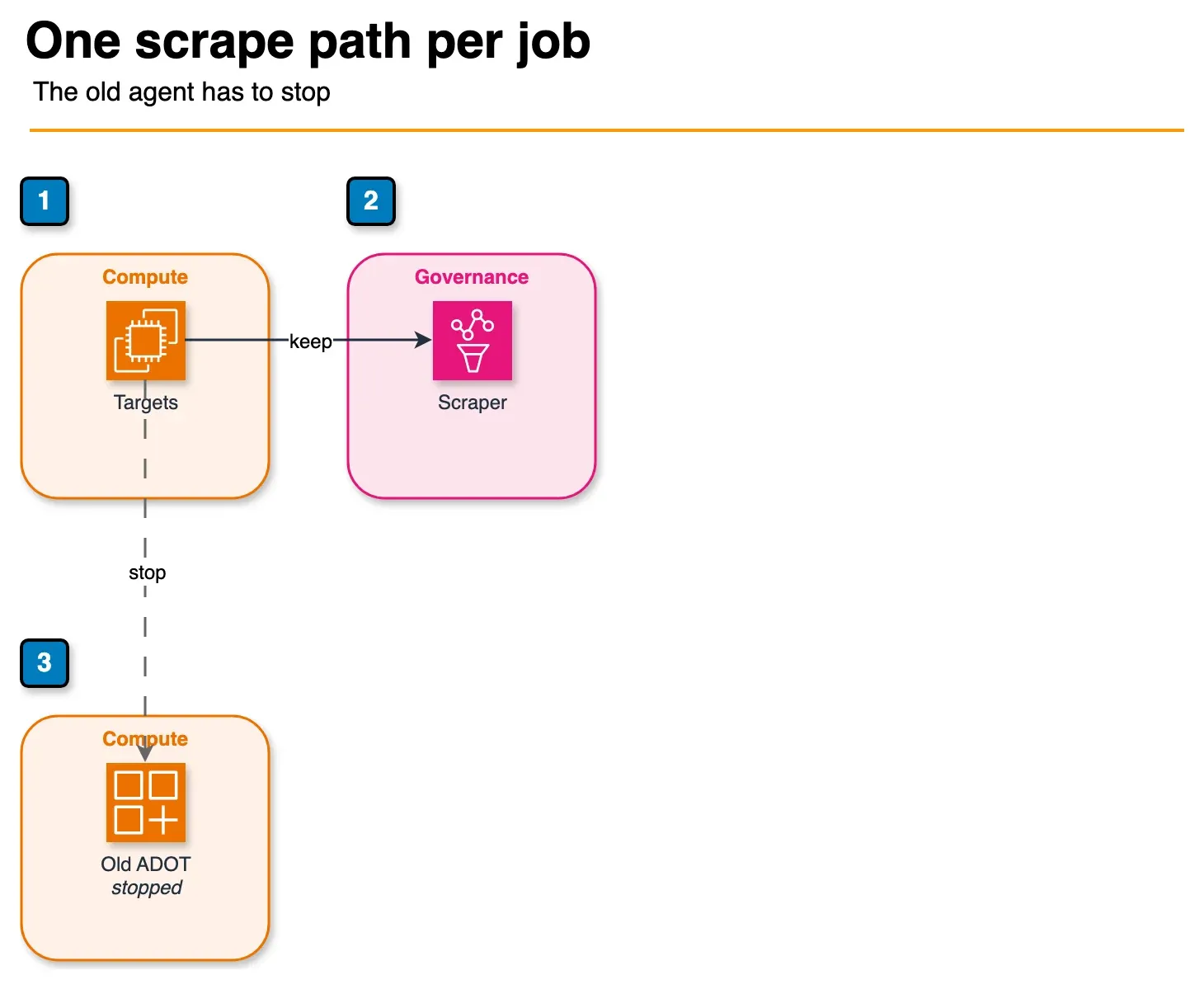
Figure: the double-ingest failure in the article. If the managed scraper and the old ADOT agent both scrape the same job, every series is ingested twice. Keep one path and drop unused metric families at scrape time. Open the draw.io source.
Related FinOps framing: observability FinOps / cardinality.
Create a scraper (EC2 path)
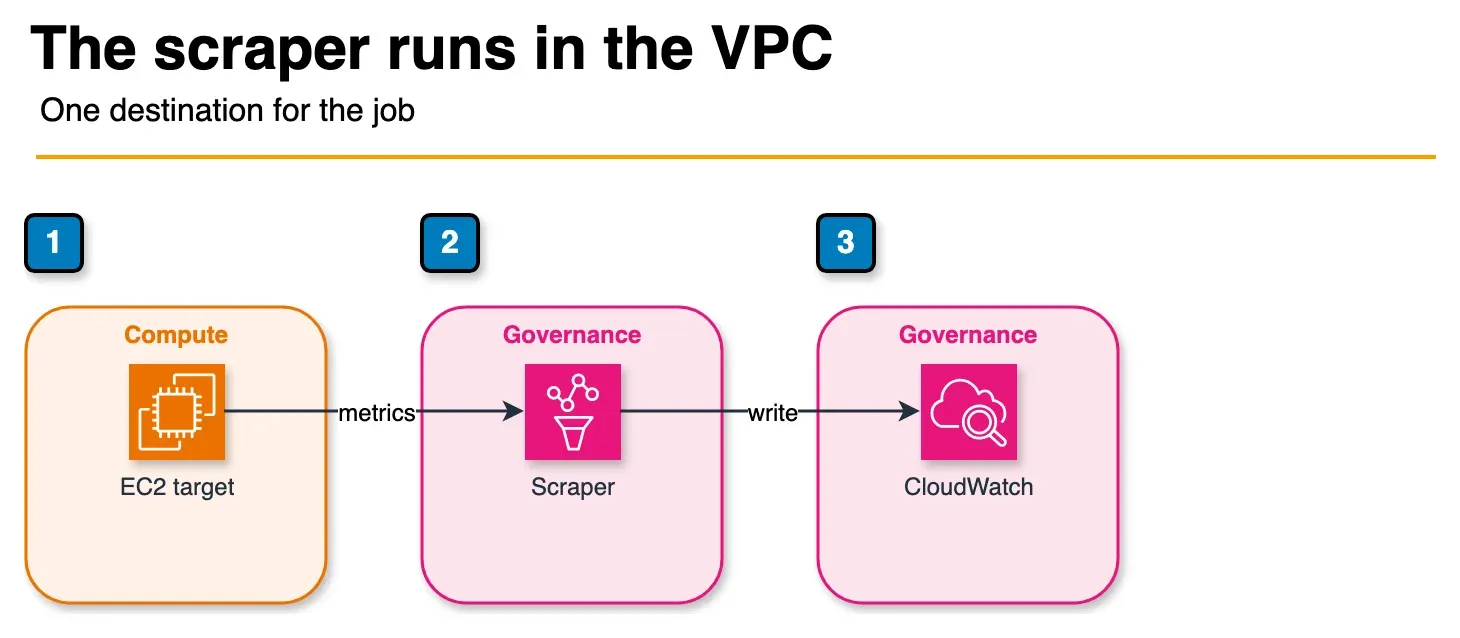
Figure: the EC2 scraper in the article. The collector runs in your subnets and writes to the destination you choose. This sample writes to CloudWatch. AMP is the other destination, not a second hop. The sample subnet, security group, and dataset ARN are not shown. Open the draw.io source.
Context: AWS CLI v2, AMP create-scraper API, CloudWatch dataset destination, scrape YAML from the sample artifact. Replace subnet, security group, and dataset ARN. Encode the YAML as the configuration blob (Linux base64 -w 0; macOS base64).
# Assumed: AWS CLI v2, credentials for the workload account, scrape YAML on disk
aws amp create-scraper \
  --alias "ec2-node-exporter-scraper" \
  --source '{
    "vpcConfiguration": {
      "subnetIds": ["subnet-aaa", "subnet-bbb"],
      "securityGroupIds": ["sg-collector"]
    }
  }' \
  --scrape-configuration configurationBlob="$(base64 < sample-ec2-scrape-config.yml | tr -d '\n')" \
  --destination '{
    "cloudWatchConfiguration": {
      "datasetArn": "arn:aws:cloudwatch:us-east-1:123456789012:dataset/default"
    }
  }'
Validate in CloudWatch Query Studio with a PromQL selector for your job label (for example {job="ec2-node-exporter"}). Collector health and scrape errors land in CloudWatch Logs; see Monitor collectors.
What to do this week
- Inventory every self-managed ADOT/Prometheus agent whose only job is scraping
/metricsinto CloudWatch or AMP. - Open the decision matrix and pick one destination per job.
- Fill the cost CSV with your series count and scrape interval.
- Pilot one EC2 or ECS job with keep/drop relabeling; watch OTel GB (or AMP samples) for 48 hours before fleet rollout.
- Turn off the old scrape path for that job only after series parity checks in Query Studio or Grafana.
What this post doesn’t cover
- Full EKS IRSA / cluster role binding walkthrough for Kubernetes service discovery (use the AWS EKS solution guide for your cluster version).
- Exact CloudWatch console clicks for automatic MSK/OpenSearch dashboards.
- Whether your CUR line item names for collector hours match AMP vs CloudWatch product codes in every region (verify in your account after the first scraper).
- Migrating Grafana dashboards off AMP when you choose CloudWatch as destination.
If you only do one thing, do not dual-ingest. Managed collectors remove the agent, but a second collector writing the same series still doubles ingestion, and scrape-everything YAML is still billed.
Frequently asked questions
What did AWS announce for CloudWatch managed Prometheus collectors?
How are CloudWatch managed Prometheus collectors priced?
When should we NOT use CloudWatch managed collectors?
Do managed collectors replace Amazon Managed Service for Prometheus?
What could go wrong when migrating scrape configs?
How do ECS and EKS discovery work with managed collectors?

Enterprise AI Transformation
Enterprise AI transformation and implementation leader focused on pilot-to-production playbooks, with a background in financial services. Writes the FactualMinds guides on serverless, CI/CD, and DevOps on AWS, the delivery plumbing production AI depends on.
 Kevin W.