AWS Tagging, Chargeback, and FinOps Ownership (2026): Tag Policy vs SCP, the Untaggable 21%, and Splitting Shared Cost Without a Spreadsheet War
Quick summary: Tag policies report; only an SCP prevents untagged spend. And ~21% of a typical bill (egress, inter-AZ transfer, Enterprise Support, shared platform services) carries no tag any tool can read. The post covers the two-layer enforcement model, the Cost Categories split-charge rules that replace the monthly allocation spreadsheet, and why you show back before you charge back.
Key Takeaways
- And ~21% of a typical bill (egress, inter-AZ transfer, Enterprise Support, shared platform services) carries no tag any tool can read
- As of June 2026, the tagging problem most teams have is that tags alone never close the bill
- First, AWS Organizations tag policies report non-compliance by default; they do not stop anyone from creating an untagged resource
- We ship the tag taxonomy, the tag policy and SCP JSON, a coverage worksheet, and the Cost Categories split-charge rules that replace the spreadsheet
- Benchmark pattern (not a cited client): A composite platform org: ~40 AWS accounts under one Organization, ~$81k/month spend, modeled in the coverage worksheet

Table of Contents
As of June 2026, the tagging problem most teams have is that tags alone never close the bill. Two facts drive the whole design. First, AWS Organizations tag policies report non-compliance by default; they do not stop anyone from creating an untagged resource. Only a service control policy (SCP) does that. Second, roughly a fifth of a typical bill carries no tag any tool can read. Until you internalize both, you keep rebuilding the same brittle allocation spreadsheet every month.
This is for FinOps leads, platform engineers, and the finance partner who owns the cloud P&L. We ship the tag taxonomy, the tag policy and SCP JSON, a coverage worksheet, and the Cost Categories split-charge rules that replace the spreadsheet.
The two-layer enforcement model
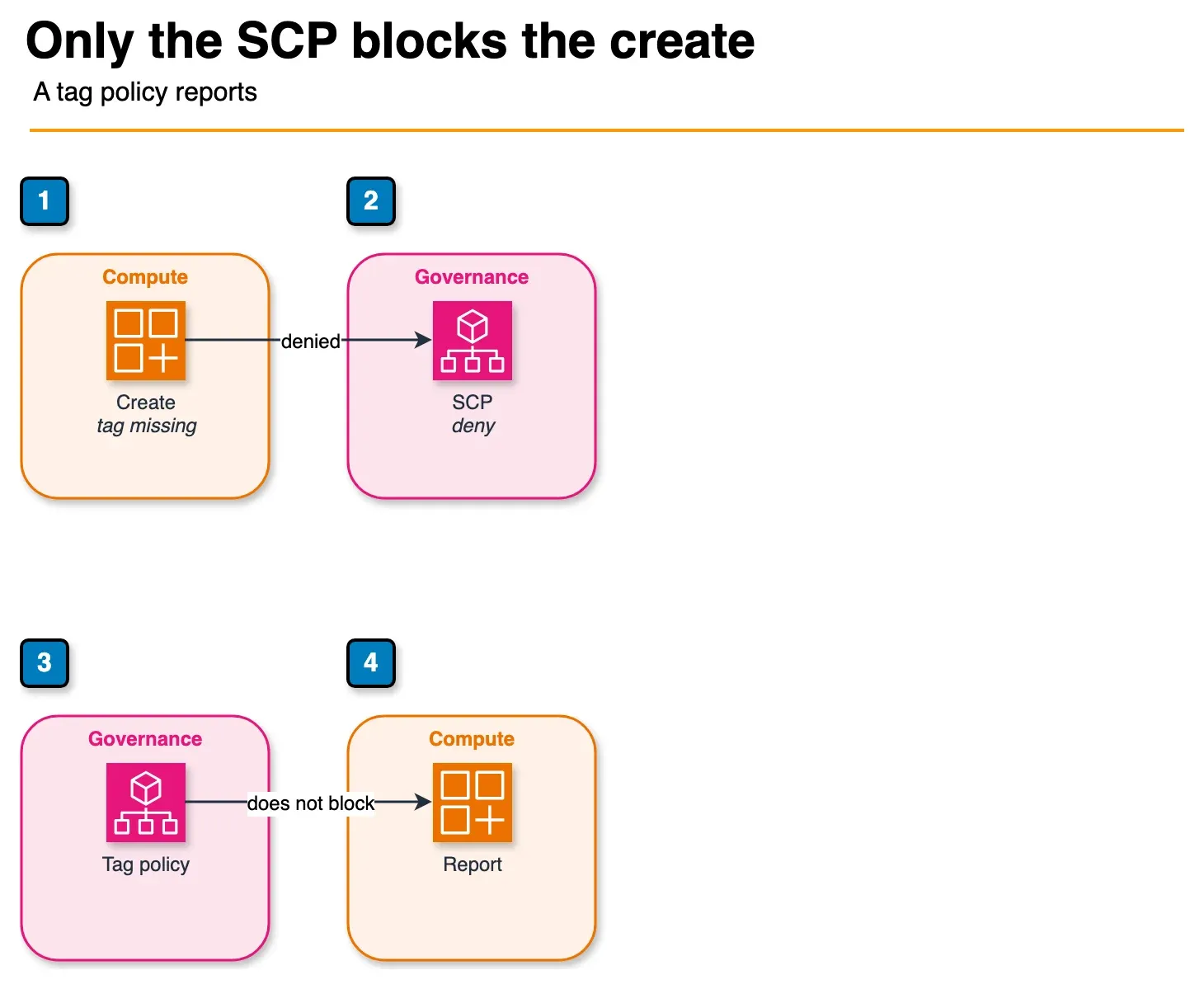
Figure: the two layers in the article. An SCP can deny a create when a mandatory tag is missing. A tag policy standardizes values and reports drift. It does not block the create. The arrows are the two layers, not a sequence. The service-linked role exemption stays in the policy artifact. Open the draw.io source.
The single most common tagging mistake is believing a tag policy enforces tags. It standardizes and reports them. To actually prevent untagged spend you need both layers:
| Layer | What it does | What it does NOT do |
|---|---|---|
| Tag policy (Organizations) | Defines allowed keys, values, capitalization; reports non-compliant resources; can prevent tag changes on resource types you list in enforced_for | Does not block resource creation; reports by default |
| SCP (Organizations) | Denies create actions (RunInstances, CreateBucket, …) when a mandatory tag is missing via a Null condition on aws:RequestTag | Does not standardize values; blunt instrument; scope it carefully |
Opinionated take: enforce a small set of 3 to 5 mandatory keys with an SCP (CostCenter is non-negotiable because it is the chargeback dimension), and use the tag policy in report mode to standardize values and surface drift on everything else. Over-specifying the mandatory set is the most common reason tag programs stall: every mandatory key is a key someone has to set on every resource, forever.
A 2026 bonus: the Terraform AWS provider (v6.22+) can validate tags against your live Organizations tag policy at plan time, so violations fail in CI instead of at apply. That is shift-left tag compliance without a separate tool.
Allocating the untaggable ~21% with Cost Categories
You will never tag a data-transfer line item or an Enterprise Support fee because there is no resource to tag. Chasing 100% tag coverage is wasted effort. Aim for 100% allocation:
- is directly taggable: allocate by the
CostCentertag once the SCP enforces it. - ~75%
- is shared/untaggable: allocate with AWS Cost Categories split-charge rules.
- ~21%
- is console-created drift: drive toward zero with the tag policy + Tag Editor; do not start chargeback until this is stable.
- ~4%
A split-charge rule has three parts: a source (the shared pool), targets (the cost-category values that receive it), and an allocation method (PROPORTIONAL, FIXED, or EVEN). Rules evaluate top-down, so the shared cost-category values must sit at the top of the rule list. Match the method to the cost:
| Shared cost | Method | Why |
|---|---|---|
| Egress + inter-AZ transfer | PROPORTIONAL | Heavier-compute teams move more data |
| Enterprise Support | EVEN (revisit later) | Flat fee; even-split avoids penalizing the biggest spender for a fixed cost |
| Platform security (KMS, Config, CloudTrail, GuardDuty) | PROPORTIONAL | Scales loosely with footprint |
| EKS control plane + shared add-ons | PROPORTIONAL | Pod-level cost handled separately by split cost allocation data |
The full rule order and rationale is in the split-charge rules artifact. Start with one PROPORTIONAL rule; resist per-cost FIXED percentages until a team disputes a specific number.
Ownership: who owns the taxonomy, the untaggable split, and the disputes
Tags fail as a technical project and succeed as an ownership model. Assign three owners explicitly:
- Taxonomy owner (Finance + Platform): owns the mandatory key set and allowed values. Adding or changing a mandatory key is a change-controlled decision, not a free-for-all.
- Allocation owner (FinOps): owns the split-charge rules and the methodology. When a team disputes their shared-cost allocation, this owner adjudicates, ideally with a written method (proportional vs even) agreed up front, so disputes are about data, not philosophy.
- Enforcement owner (Platform): owns the SCP and its exemptions. Every exemption (
terraform-apply-*, SSO admin roles, service-linked roles) is documented and reviewed.
Without named owners, the tag policy drifts, the split rules ossify, and the unallocated bucket creeps back up.
Cost allocation tags are not retroactive, so activate early
Activating a tag as a cost allocation tag in the Billing console takes effect going forward (typically ~24h), not retroactively. History before activation cannot be sliced by that tag. So activate the mandatory keys the moment the taxonomy is defined, even while you are still in showback, so the historical coverage builds while enforcement stabilizes.
CUR 2.0 + Athena: the default chargeback data plane (June 2026)
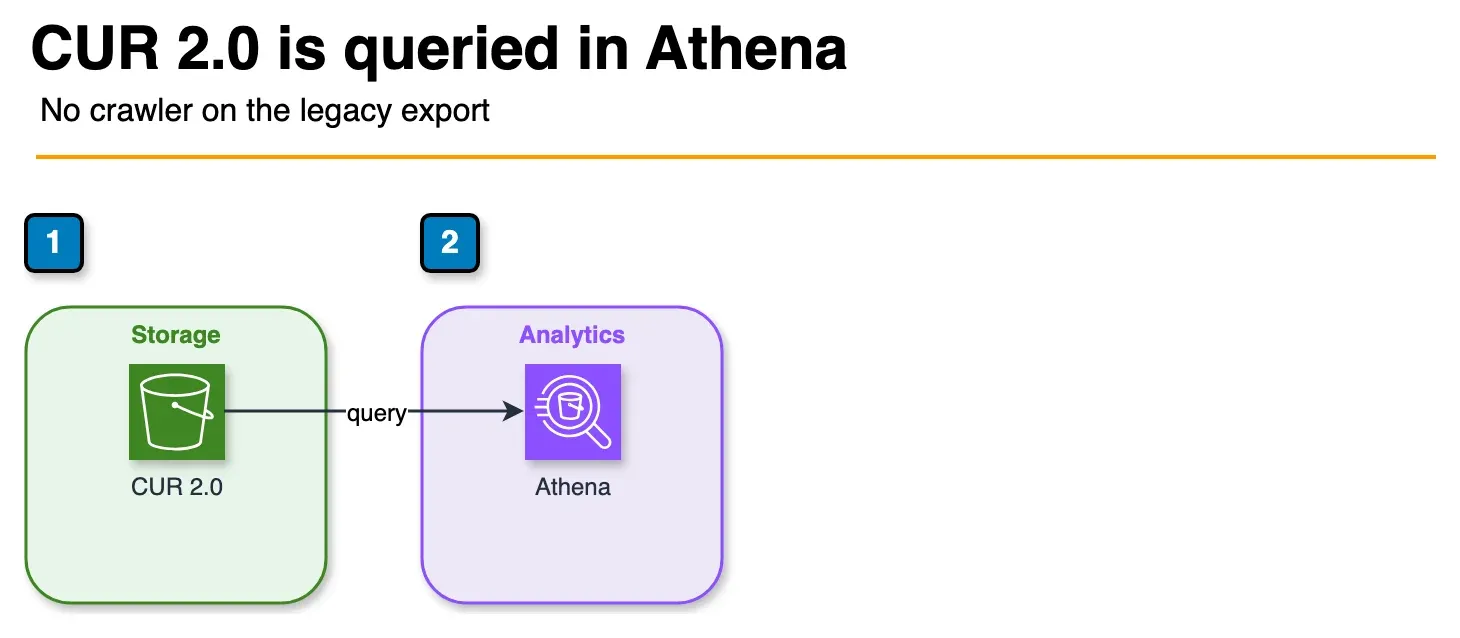
Figure: the chargeback data plane in the article. New showback queries use CUR 2.0 in Athena. A Glue crawler on a legacy CUR is the path this replaces. Split-charge percentages and the rule order stay in the article. The worksheet files under the other tagging folder were left alone. Open the draw.io source.
Showback and chargeback dashboards need SQL over granular billing data. On June 2, 2026, AWS added native Athena and Redshift integration for CUR 2.0 (Data Exports): table definitions, Parquet delivery, and automatic refresh without custom ETL. New implementations should use CUR 2.0 with Athena rather than hand-rolling Glue crawlers on legacy CUR. Cost Categories split-charge outputs still surface in Cost Explorer; CUR 2.0 is where you validate allocation math and build per-team showback reports finance trusts.
What to do this week
- Publish the tag taxonomy with 3 to 5 mandatory keys. Name the taxonomy, allocation, and enforcement owners in the same doc.
- Turn on the tag policy in report mode. Use Tag Editor to fix the worst non-compliant resources.
- Activate the mandatory keys as cost allocation tags in the Billing console today. It is not retroactive.
- Deploy the SCP to one non-prod OU first, with
ArnNotLikeexemptions for automation and service roles. Watch for broken launches for a cycle before widening to prod. - Build a
TeamCost Category fromCostCenter, put theShared-Platformvalue at the top of the rule list, and add onePROPORTIONALsplit-charge rule. Publish as showback for one cycle before chargeback.
What this post doesn’t cover
- Third-party FinOps platforms (CloudHealth, Apptio Cloudability, etc.): this is the native-tooling path; third-party tools layer on top.
- Kubernetes pod-level cost allocation: EKS split cost allocation data and tools like Kubecost are a separate layer for in-cluster attribution; only the control plane is covered here.
- RI / Savings Plans amortization sharing: how to spread commitment discounts across teams is its own decision; see Reserved Instances vs Savings Plans.
- Anomaly detection and budgets: covered in Cost Anomaly Detection and the Cost Explorer and Budgets guide.
Related: The FinOps gap: engineering cost ownership · FinOps on AWS: complete guide · Reserved Instances vs Savings Plans · AWS cost optimization services
If you only do one thing: Activate your CostCenter tag as a cost allocation tag in the Billing console today. It is not retroactive, so every month you wait is a month of history you can never slice by team.
Frequently asked questions
What is the difference between an AWS Organizations tag policy and an SCP for tagging?
Why can we only allocate about 80% of our AWS bill with tags?
Should we do chargeback or showback first?
When should we NOT enforce a tag with an SCP?
How do we allocate shared costs like data transfer and Enterprise Support across teams?
Are cost allocation tags retroactive once we activate them?

Ecommerce Growth & Retail Marketplaces
Ecommerce growth leader working across ratings and reviews, Walmart review syndication, retail marketplaces, and email and SMS deliverability. Writes the FactualMinds guides on AWS cost optimization and FinOps for teams that need cloud spend to stay predictable.